Perceptible Privacy
I wanted a simple counter that increments by one when someone views my page. Nothing else.

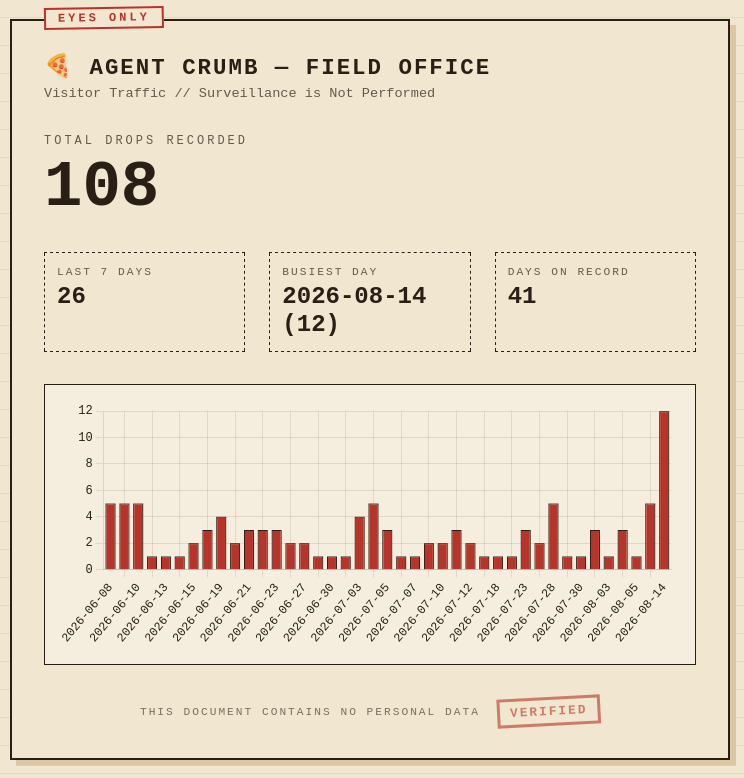
I spent the last few days looking at ways to see the traffic to my blog. I didn’t want to double my monthly blog hosting expenses to add the analytics ghost.io provides. So, I started looking around. It didn’t end well.
I wanted a simple counter that increments by one when someone views my page. I visualized it as a physical traffic counter that tells you a car drove over but, doesn't tell you which car. I didn’t want to know the age, gender, or interests of my visitors (I’m looking at you Google Analytics). I don’t need to be looking over visitor’s shoulders as they look through my blog, StatCounter. If something on my blog is really good or broken, I expect my visitors to tell me, hopefully politely, in the comments. Preferably with a link on how to fix it. So, I did what any new blog owner that doesn’t want to violate anyone’s privacy would do, I decided to make my own. Unlike last time, it was 10am and I wasn’t in my nightgown. I was in my pajamas and they could count as appropriate casual wear, if I was going to Walmart.
There were serveral options to consider:
Homelab-hosted: a tiny Flask or Node endpoint on your box, exposed via a tunnel. Fits the self-hosting worldview and keeps the data literally in your house.
Serverless: a Cloudflare Worker + KV store. No home server, free tier, and it's the lowest-friction "increment a number" of the options.
Off-the-shelf: self-host a cookieless analytics tool like Umami or GoatCounter on the homelab. You'd get the counter plus a dashboard, no reinventing but more than you strictly need for a single tally.
I decided to go with homelab-hosted and a TailScale funnel. Cloudflare required DNS wrangling. After that “Incident” earlier I wasn’t going there. I also chose to go with a public/private split tunnel design after discussing security implications and reading through the docs. I did understand most of it. Tailscale has good documentation
It almost worked and would have if:
cors error:[error message from developer tools]
There's a button on my laptop now for a tailscale tunnel and I can toggle the laptop connection on and off. So, now that I know I can do that, that's not a huge problem.
TL/DR: I now have a working counter for my blog with a themed interface that doesn't make me feel like I need to take a hot shower when I use it.
Not bad for a few hours of work that felt like play, because it was play.